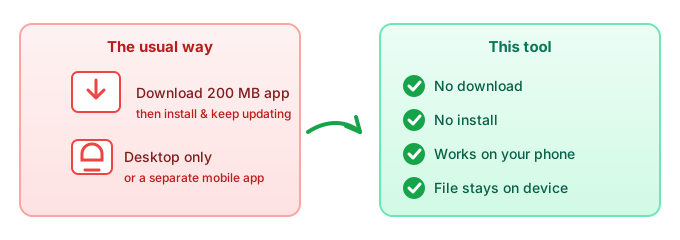
The short answer: the easiest way to remove a video background without downloading anything is a tool that runs in your browser. You open the page, drop in a clip, and it keys the background out on your device — no app to install, no desktop software, and it works the same way on your phone. The reason it can skip the download is simple: the work happens in the tab, not on a server you'd need to install client software to reach. Big video editors ask you to download hundreds of megabytes first; an in-browser remover is just a URL.
Why "no download" is the right fit for video
Video is the worst kind of file to push through a download-and-install workflow, and that's exactly why skipping it helps:
- Your clip never leaves the device. Cloud editors make you upload the footage, process it on their servers, then download the result. An in-browser remover mattes the frames where the file already is, so the raw video stays with you.
- No 200 MB install before you've even started. A desktop suite can take minutes to download and set up just to cut one background. A web page is open in a tap.
- No "update available" nag. Installed software ages — it nags you to update, and old versions stop working. A browser tool is always current because there's nothing stored on your machine.
- Same tool on every device. The page is the app, so the laptop, the tablet, and the phone all run the identical thing.
Does it work on a phone?
Yes. Because it's a web page rather than a program, the same remover opens in Safari or Chrome on an iPhone and in Chrome or Samsung Internet on Android — no App Store or Play Store install. That matters for video specifically: phone cameras shoot large clips, and on-device matting means you're not burning mobile data uploading them to a cloud editor and downloading them back. Open the page, pick the clip, and the background is cut right there.
No-download vs downloading an app
| Factor | In-browser (no download) | Desktop / video app |
|---|---|---|
| Install required | No | Yes — often 100s of MB |
| Works on phone | Yes, in the browser | Usually desktop-only or a separate mobile app |
| File leaves your device? | No | Often yes (cloud editors upload it) |
| Updates | None — it's a URL | You update it yourself |
| Best when | You want it done now, on any device | You're already running a full edit suite |
When you just need a background gone — for a TikTok, a product clip, or a quick overlay — the in-browser route gets there without the install tax.
Common questions
Can I remove a video background without downloading software?
Yes. An in-browser remover needs nothing installed; you open the page and drop in the clip. There's no setup step before the first cut.
Will it work on my iPhone or Android?
It will. The tool is a web page, so it runs in mobile browsers too — no App Store or Play Store install required.
Do I have to upload my video anywhere?
No. The background is removed on your device, so the clip isn't shipped off to a server to be processed.
Is it free?
The in-browser route has no server cost to recover, so there's no paywall in front of it. You can read the full free breakdown in the free green screen remover guide.
What if I shot on a green screen?
That works too — a browser remover handles both plain chroma-key clips and footage with no colored backdrop. See removing a video background without a green screen.