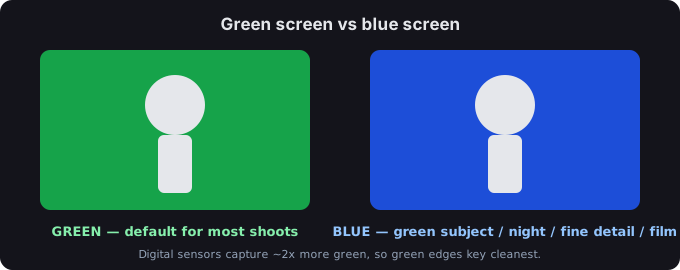
Why green wins most of the time
Two technical reasons push most work toward green, and both come from how cameras record color.
The sensor sees more green. A digital camera's Bayer filter puts twice as many photosites on green as on red or blue, so the green channel carries the most detail and the least noise — exactly what keying software needs for a clean matte. Boris FX puts it plainly: "digital cameras capture more in the green channel than they do either red or blue," and Adobe quotes filmmaker Charles Yeager: "With digital cameras, green is more popular." Sources: borisfx.com, adobe.com.
Green is far from skin tones. Green (and blue) sit away from most human skin, hair, and clothing colors, so an actor is unlikely to be keyed out by accident. Boris FX notes green is "the color furthest from human skin tones," and Adobe makes the same point about why blue/green are the standard backdrops. Sources: borisfx.com, adobe.com.
Green is cheaper to light. Green has much higher luminance than blue, so a green screen needs less light to read as a solid color — easier on a tight budget and a better match for bright, daytime footage. Sources: borisfx.com, adobe.com.
When blue is the better call
Green is the default, not the rule. Use blue in these specific situations:
- Your subject is green. Foliage, a green costume, a green product — anything green in frame should sit on blue so it isn't keyed out with the background. Boris FX: "If you need to have something green in the shot, a blue screen would be a better choice." Adobe agrees: green clothing → blue background. Sources: borisfx.com, adobe.com.
- Dark or night scenes. Blue is darker, so it reflects less light back onto your subject — less color spill to fix later. Yeager (via Adobe): "If you're trying to composite around an actor in a night scene, you want to go with a blue screen." Boris FX says blue "doesn't need to be lit as much" and matches darker footage. Sources: borisfx.com, adobe.com.
- Fine detail and blonde hair. Because blue has lower luminance, there's less spill around edges — better for small, detailed subjects and for blonde hair, which Yeager calls "difficult to key out on a green screen" because light passes through it; "A blue screen gives you a much stronger contrast with blond." Sources: borisfx.com, adobe.com.
- Physical film. On film, the blue channel has the least grain, so blue gives a cleaner matte. Boris FX: "film cameras work better with blue screen." Source: borisfx.com.
- Outdoor shots with greenery or water. If trees and grass will be in frame, use blue; if there's a large body of water, use green. Source: adobe.com.
Quick decision table
| Situation | Use |
|---|---|
| Standard digital shoot, neutral subject | Green |
| Subject contains green (foliage, green clothes) | Blue |
| Night / dark scene | Blue |
| Fine edges, blonde hair, small detail | Blue |
| Physical film | Blue |
| Outdoor with trees/grass in frame | Blue |
| Outdoor with water in frame | Green |
| Tight lighting budget / bright daytime | Green |
The actual color values
Once you've picked, use a color the keyer expects. These are the same values as our green screen background images page, and each is sourced:
| Use | Hex | RGB | Cited source |
|---|---|---|---|
| Chroma key green (most common) | #00B140 | rgb(0, 177, 64) | filmdaft.com, hypertexthero.com, black-screen.dev |
| Pure green (OBS default; more spill) | #00FF00 | rgb(0, 255, 0) | black-screen.dev |
| Chroma key blue | #0047BB | rgb(0, 71, 187) | hypertexthero.com |
| Blue screen (alternative) | #150DF7 | rgb(21, 13, 247) | color-name.com |
How to key it out
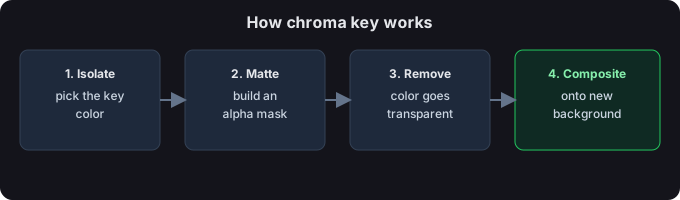
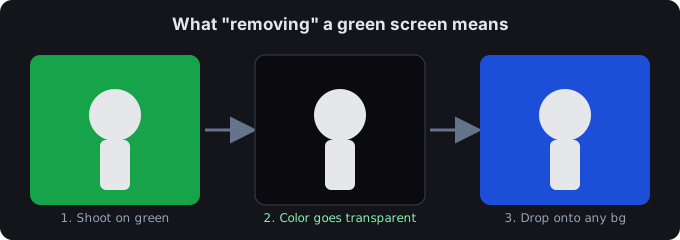
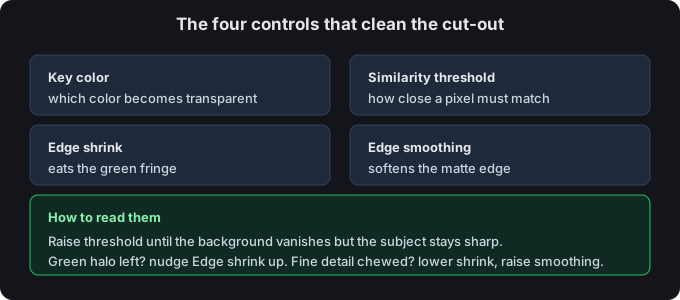
After you shoot against your chosen color, turn it transparent with the background remover (images and video, in your browser), or open the green screen app on your phone. Both handle green and blue. Need a solid backdrop to shoot against? Grab one from the green screen background images page.
Common questions
Is green always better?
No. Green is the default for digital work because of the sensor and skin-tone reasons above, but blue is the right call for green subjects, night scenes, fine detail, and physical film. See the table. Sources: borisfx.com, adobe.com.
Can I use a color other than green or blue?
Technically any solid color works — Boris FX notes yellow has been used when neither green nor blue fits. But green and blue are the standards because they sit away from skin tones, so they remain the safe everyday choice. Source: borisfx.com.
What if my subject is green?
Use a blue screen, so the green in your subject isn't pulled out with the background. Sources: borisfx.com, adobe.com.
Does the screen color change how I remove it?
The removal step is the same idea — key out the background color — but green needs less light to read as solid, while blue's lower luminance means less spill to clean up. Pick the color first (this page), then remove it on the blue-screen remover or the background remover.
Start from the tool
Back to the green screen tool, or read what chroma key is before you decide.