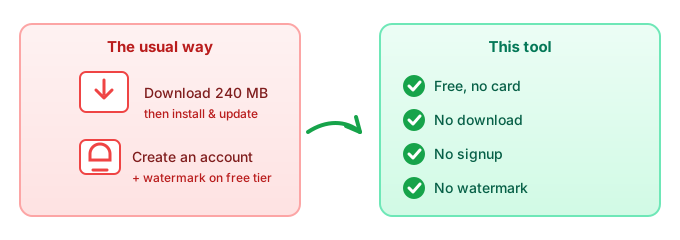
The short answer: the best free green screen remover is one that runs in your browser. You open the page, drop in a clip or photo, click the green, and it turns transparent — no download, no account, no watermark. "Free" that still makes you install a 200 MB app or register before you can export isn't really free; it's a trial with a fence around the exit.
What "free" should actually mean here
Four things separate a genuinely free tool from one that's free-to-start:
- No download. You don't install anything. A browser tab is the whole app, so there's nothing to update or uninstall later.
- No signup. No email, no password, no "create an account to continue." The job runs without knowing who you are.
- No watermark. The exported file is clean — your name on someone else's logo isn't part of the deal.
- No hidden usage cap. You can run it more than twice without a "upgrade to keep going" wall.
If a tool fails any of those four, it's renting you the feature, not giving it away. That's fine as a business — just call it a trial.
Why in-browser is the lightest free option
A local, browser-based remover builds the matte with JavaScript/WebGL right on the page. That single fact is what lets it stay free and frictionless:
- Nothing to install. The "app" is a URL. That's the entire reason there's no download step.
- Nothing to upload. Because the file is processed where it already is, there's no server cost to pass on — which is also why there's no paywall.
- No account to gate it. With no server-side processing, there's nothing to meter per user, so signup adds no value and gets dropped.
- No watermark to "unlock." The output is rendered on your device; slapping a logo on it would be pure friction, so it isn't.
Free vs the big tools
| Factor | This tool (in-browser) | Big design suites |
|---|---|---|
| Download required | No | Often yes (desktop app) |
| Account required | No | Usually yes for full features |
| Watermark on free tier | None | Often yes |
| File leaves your device? | No | Yes — uploaded to their server |
| Best when | You want it done now, privately, free | You need a full edit suite anyway |
The big suites earn their place when you're compositing, resizing for ten platforms, and collaborating. For the single job of "make this background disappear for free," the in-browser route is lighter and keeps your file with you.
Common questions
Is a green screen remover really free?
Yes — when it runs in your browser. There's no server cost to recover, so there's no paywall to hide it behind. You can run it as many times as you want.
Do I have to download or install anything?
No. It's a web page; you open it and drop in a file. There's nothing to install, update, or remove afterward.
Will there be a watermark?
Not on the free tier here. The output is rendered on your device, so there's no logo stamped on it.
Do I need to sign up?
No account, no email, no password. The tool doesn't need to know who you are to cut out a background.
Does it work on my phone?
Yes. It's a web page, so the same tool runs in mobile browsers; there's also a dedicated green screen app version for a tidier phone experience.