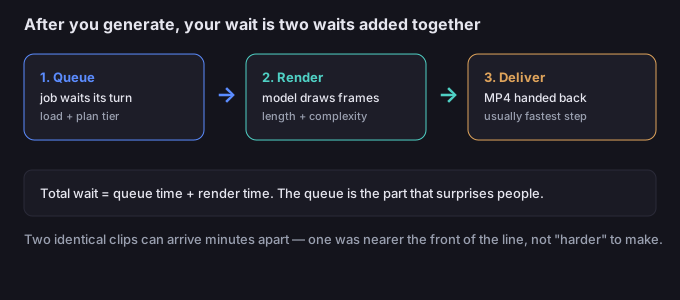
The first thing to understand is that "how long does it take" is really two numbers added together. The render itself — the model actually drawing the frames — is the smaller, more predictable part. The queue — the line you stand in before the model even starts — is the part that surprises people. Most "it's taking forever" complaints are queue wait, not slow rendering.
What actually happens after you hit generate
When you submit a character image plus a reference video, the job is not rendered instantly. It is placed in a processing line behind other jobs. Only when it reaches the front does the model start drawing your clip. So the timeline is:
- Queue — the job waits its turn. This is where plan tier and current server load matter most.
- Render — the model generates the frames from your inputs. Longer and busier clips take more of this time.
- Deliver — the finished MP4 is handed back to you. This is usually the fastest step.
This is why two identical-looking clips can come back minutes apart: one was nearer the front of the queue, the other waited. The clip itself was not "harder" — the line was longer.
What changes your total wait
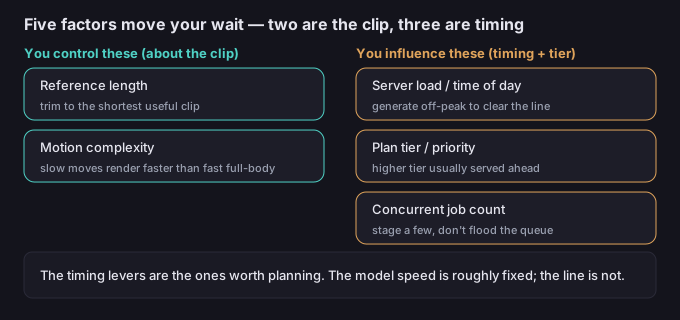
Five factors move the number. You control some directly; others you only influence by timing.
| Factor | How it affects wait | What you can do |
|---|---|---|
| Reference video length | Longer references mean more frames to process, more render time | Trim the reference to the shortest clip that still shows the motion you want |
| Motion complexity | Fast, full-body, multi-limb motion asks more of the model than a slow head turn | Test the hardest motion on a short clip first, not a long one |
| Time of day / server load | Peak hours fill the queue; off-peak clears it faster | Generate when your region is asleep or between work hours if speed matters |
| Plan tier / priority | Higher tiers are generally served ahead of free or lower tiers | Treat a paid tier as a queue shortcut when you have a deadline |
| Number of concurrent jobs | Many jobs at once each wait in line; they do not all jump the queue | Stage a few, not dozens, and reuse the good reference across them |
The honest takeaway: only two of those — reference length and motion complexity — are about the clip itself. The rest are about when and how you submit. That is good news, because timing is something you can plan.
5-step workflow to cut the wait
- Trim the reference first. Cut the source to the exact motion you need — a 5-second clean take beats a 20-second messy one. The model only needs to learn the motion, not sit through filler.
- Pick the right moment. If the result is time-sensitive, submit during off-peak hours for your region. You are not racing the model; you are racing other users' jobs.
- Choose the tier by deadline. For a one-off test, free or low tier is fine. For a publish deadline, the higher tier's queue priority is the lever that actually moves the needle.
- Stage, don't flood. Queue three or four variations rather than twenty at once. A small batch finishes and frees capacity; a huge batch just extends everyone's line, including yours.
- Keep the character image ready. Prepare and save the character image up front so each new job is only a reference swap. The setup time you save is real time you are not spending in front of a spinner.
5 failure modes (and the fixes)
| Failure | Why it happens | Fix |
|---|---|---|
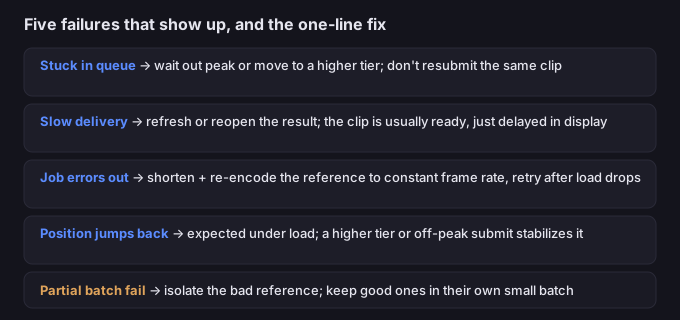
| Stuck in queue for a long time | Peak load or a lower tier behind higher tiers | Wait out the peak, or move the job to a higher tier; don't resubmit the same clip (that adds another line) |
| Render finished but delivery is slow | Edge/CDN handoff hiccup, not the model | Refresh or re-open the result; the clip is usually ready, just delayed in display |
| Job errors out before finishing | Reference too long, wrong format, or a transient load spike | Shorten and re-encode the reference to a constant frame rate, then retry once load drops |
| Position keeps jumping back | New higher-priority jobs entered ahead | Expected under load; a higher tier or off-peak submit stabilizes position |
| Batch partially fails | One bad reference in a large batch stalls the group | Submit the questionable reference alone; keep good references in their own small batch |
What to do when the motion is right but you're still waiting on delivery
A long queue never damages your clip — it only delays it. The motion you asked for is the same whether it comes back in two minutes or ten. So the move when things are slow is patience plus smart staging, not resubmitting, which only lengthens the line for everyone.
If you also plan to isolate the character (for compositing onto a new scene), do the background removal after delivery so the transparent subject carries cleanly into your editor. The tool on this site runs in your browser, so your video never leaves your device while you work — nothing is uploaded to a server.
Common questions
Is there a precise render time I can rely on?
No published fixed clock. Short clips commonly complete within a few minutes of rendering, but the variable is the queue, and that depends on load and tier at the moment you submit. Plan for "a few minutes plus whatever the queue adds," not a guaranteed number.
Does a higher tier actually render faster?
The render step is similar; the difference is usually queue priority — higher tiers are served ahead of lower ones, so the wait shrinks mainly at the front of the line, not during the draw.
Will a longer reference video give better motion?
Only if the extra seconds show motion the short clip missed. A longer reference mainly adds render time and queue weight, so trim to the useful part.
Should I submit many jobs at once to save time?
No. A flood of jobs each waits in line; they don't all jump the queue. A small staged batch finishes sooner and frees capacity for the next.
Are my files uploaded when I edit them later?
No. Anything you process with the tools on this page runs in your browser; we never receive your media.