The most common blocker for Motion Control is "I don't have a video of that dance / walk / gesture." You don't need one. The reference is only a motion source — a short clip the model reads to learn timing, body angles, and trajectory. It does not become the subject; your character image does. That means the reference can come from almost anywhere, as long as the motion in it is clear.
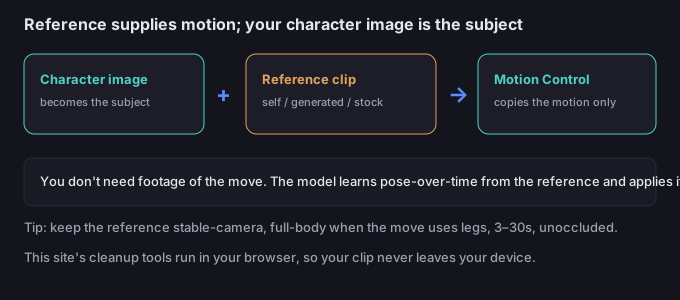
Why "no footage" is not a problem
Motion Control transfers the 2D movement it sees in the reference onto your character image. It is learning pose-over-time, not recognizing a person. So the reference's identity is irrelevant — what matters is that the motion is legible. A clip of you doing a rough version of the move teaches the model just as well as a polished clip of a stranger, because only the movement is extracted.
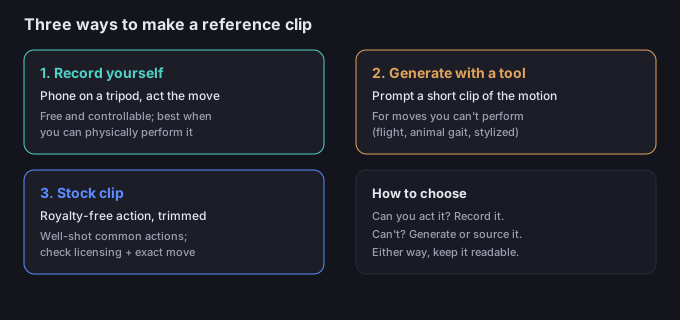
Three ways to make a reference
| Method | What you do | Best for | Watch out for |
|---|---|---|---|
| Record yourself / a stand-in | Phone on a tripod, act the move for 3–30s | Any motion you can physically perform; highest control | Shaky handheld cam, cluttered background |
| Generate with another AI video tool | Prompt a short clip of the motion, use it as the reference | Moves you can't perform (flight, animal gait, stylized) | That tool's own artifacts bleeding into the motion |
| Use a royalty-free stock clip | Download a clean clip of the action, trim to 3–30s | Common, well-lit actions already shot well | Licensing and whether the exact move exists |
Rule of thumb: if you can act it, record it — it's free and controllable. If you can't (a non-human gait, something physically impossible), generate or source it.
What makes a good reference
A reference doesn't need to be cinematic — it needs to be readable. Aim for:
- Full body in frame when the motion uses the legs; upper-body framing only works for face/arm gestures.
- Stable camera. A locked-off shot beats a hand-held one — the model reads the subject's motion, not the camera's.
- Clear, unoccluded subject. No objects in front, no cutting the body at the frame edge.
- Decent light and contrast against the background so the body is easy to track.
- 3–30 seconds of the actual move, with a beat of stillness before and after if you can.
5-step workflow to a usable reference
- Pick the method. Can you perform it? Record yourself. Can't? Generate or source a clip.
- Capture or generate the clip. Phone on a stable surface, or prompt another video tool for the exact motion.
- Trim to the move. Cut to roughly 3–30 seconds containing the action; drop dead time.
- Check readability. Scrub through: is the full body visible, the camera steady, the subject unobstructed?
- Generate, then clean up. Feed reference + character image to Motion Control; afterwards you can remove the background or composite using the browser tool on this site.
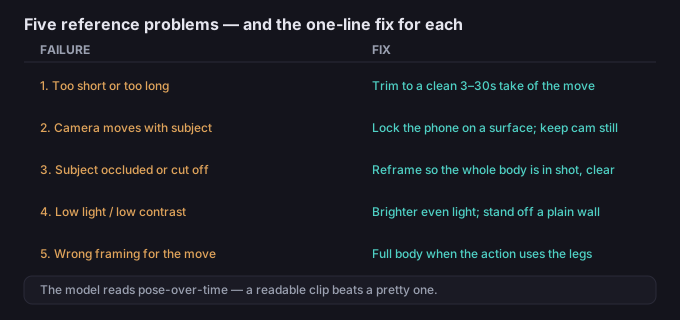
5 failure modes (and the fixes)
| Failure | Why it happens | Fix |
|---|---|---|
| Reference too short or too long | Outside the 3–30s window the model expects | Trim to a single clean take of the move, 3–30s |
| Camera moves with the subject | Hand-held or follow-cam confuses motion vs camera | Lock the phone on a surface; keep the camera still |
| Subject occluded or cut off | Object in front, or body at the frame edge | Reframe so the whole body is in shot and clear |
| Low light / low contrast | Model can't track the body against the background | Move to brighter, even light; stand off a plain wall |
| Wrong framing for the motion | Upper-body shot but the move needs the legs | Shoot full body when the action uses the lower body |
What to do when the motion is right but the rest isn't
A good reference is the cheapest lever you have — it's a short clip you make in minutes, and it decides whether the output reads. Once the motion is copied onto your character, the rest is assembly: trim it, drop or replace the background (the browser tool here keeps your clip on-device), and export for the platform. You never have to upload your media to a server to do the cleanup.
Common questions
Do I need footage of the exact person or character?
No. The reference only supplies motion. Your character image becomes the subject; the reference's identity is ignored.
Can I use a clip made by another AI video tool as the reference?
Yes. Generate a short clip of the motion and feed it as the reference. Just watch for that tool's own glitches, which can leak into the copied motion.
How long should the reference be?
Around 3–30 seconds containing the actual move, with a little stillness around it if possible.
Is my clip uploaded when I edit it later?
No. The background and cleanup tools on this site run in your browser; your media stays on your device.