Motion Control is identity-anchored, but the anchor is thin: you give it one character image, and every frame it re-derives that person from the pose it estimates plus what it expects a face to look like. That works beautifully when the face stays in view, and falls apart the moment the input stops giving the model a clear, consistent face to copy. When your character's identity "changes" mid-clip, that is a signal about your inputs — which also means it is something you can fix before spending another generation.
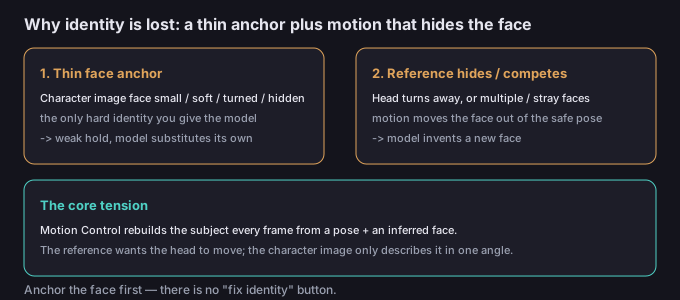
Why identity is the fragile part
Unlike a normal video where the same pixels carry identity forward, Motion Control rebuilds the subject every frame from a pose plus a face it infers. Your character image is the only hard identity you supply. The reference supplies the motion — and motion is exactly what moves the face out of the safe, front-on pose your anchor represents. So the two inputs are in quiet tension: the reference wants the head to move, and the character image can only safely describe the head in the angle you shot it. Past that angle, the model is guessing, and face guesses are where identity slips.
The symptoms (and what each one really means)
| Symptom | Likely cause | Fix |
|---|---|---|
| Face correct at start, becomes a stranger | Reference turns the head away past the angle your character image covers | Trim or soften the head turn; or accept the turn and face-lock in post |
| Face changes every few seconds | Weak face anchor: small / low-detail / occluded character image | Use a larger, sharp, front-facing, well-lit character image |
| Face differs between frames with no motion | Seed / style variance; over-strong style prompt | Lower style strength; keep character image identical across the series |
| Wrong face entirely | Multiple faces or a passing face in the reference | Single, clearly-the-right face in the reference; trim stray faces |
| Hair / age / skin tone drift | Face partly hidden for long stretches; model re-derives soft features | Keep the face visible; shorten the hidden stretch |
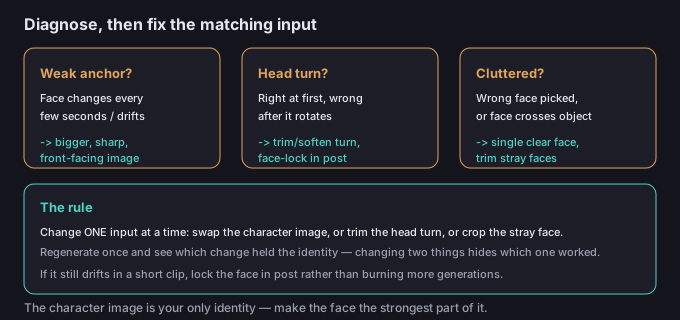
5-step fix workflow
- Name the failure. Is the face only wrong during a head turn, or wrong everywhere? Does it change every few seconds, or pick the wrong person? The fix is different for each, and each points at a different input.
- Check the character image first. Zoom in on the face. Is it large, sharp, front-facing, and well-lit — or small, soft, turned, or partly out of frame? The output face can only be as stable as the face the model has to copy. This is the cheapest win nine times out of ten.
- Check the reference for head motion and clutter. Play it back. Does the head turn fully away? Are there other faces, or a hand, object, or shadow crossing the face? The reference is feeding the model its idea of where the face goes; if the face leaves or competes, identity leaves with it.
- Re-pick or re-shoot one thing at a time. Swap to a stronger character image, or trim the head turn, or crop the stray face — regenerate once — and see which change held the identity. Changing two things at once hides which one worked.
- If it still drifts in a short clip, lock the face in post (a face-swap / face-lock pass, or patching the few bad frames) rather than burning generations on a problem you've already isolated.
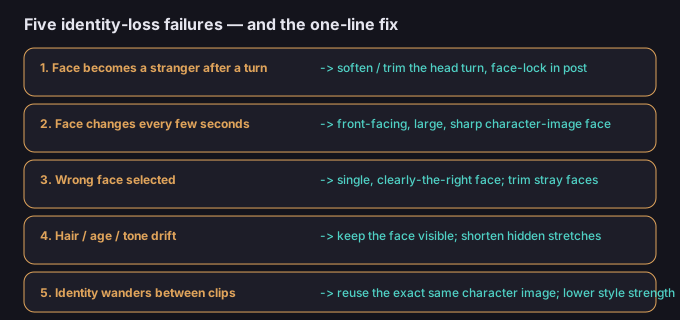
5 failure modes (and the fixes)
| Failure | Why it happens | Fix |
|---|---|---|
| Face becomes a stranger after a turn | Head rotates past the angle your character image covers | Soften or trim the head turn; face-lock the turn in post |
| Face changes every few seconds | Small / low-detail / occluded character-image face | Front-facing, large, sharp character-image face |
| Wrong face selected | Multiple faces or clutter in the reference | Single, clearly-the-right face; trim stray faces |
| Hair / age / tone drift | Face hidden for long stretches in the reference | Keep the face visible; shorten hidden stretches |
| Identity wanders between clips | Different character image or heavy style per clip | Reuse the exact same character image; lower style strength |
What to do about the character image
The character image is your only identity anchor, so it earns the most attention. Use a front-facing shot where the face fills a meaningful part of the frame, is in sharp focus, evenly lit, and unobstructed. Avoid sunglasses, heavy shadows, a turned-away pose, or a tiny face lost in a wide shot — those all weaken the anchor and the model will substitute its own. And keep the same character image across a series: swapping images between clips is the fastest way to make a person look like five different people.
Common questions
Is there a "fix identity" button?
No. Motion Control has no identity-lock repair. You hold identity by strengthening the character image and controlling the reference — or by face-locking the final clip in post.
Does a profile character image help for side shots?
It helps only if the reference stays in profile. The mismatch problem appears when your character image is profile but the motion turns the face front, or vice versa. Match the dominant face angle of your reference.
Why is it correct for one second then wrong?
That is the classic head-turn signature: the first frames hold your anchored front face, then the reference rotates the head past what your image describes and the model invents the rest. Trim or soften the turn.
Does match image mode hold identity better?
Where available, holding the still composition (match image) instead of copying a moving camera can keep the face more stable, because the model leans on the static character image longer. Test it for clips where a steady face matters more than a moving camera.
Is my clip uploaded when I fix the background later?
No. The background tools on this site run in your browser, so the media stays on your device.