The character image is supposed to be the identity anchor — the model should keep your subject's face, build, and outfit while it applies the reference's motion. When that anchor slips, the result looks like "a different person wearing the costume," or the face morphs mid-clip. That's drift, and it's almost always caused by something you can control upstream rather than a model defect.
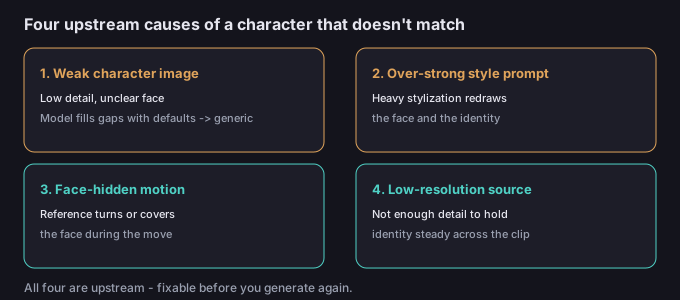
Why the character drifts
Identity is read from the character image, but three things can override it: a heavy style prompt that re-skins the whole frame, a reference whose motion turns the head away or covers the face, and a source image that simply doesn't give the model enough detail to hold onto. The model fills the gaps with its own defaults — which is why the output can look "generic" rather than "yours."
Symptom → cause → fix
| Symptom | Likely cause | Fix |
|---|---|---|
| Face changes mid-clip | Reference hides/tilts the face during motion | Use a reference with the face visible; add a calm front frame |
| Looks like your character but generic | Source image too low-detail | Use a sharper, higher-detail character image |
| Skin tone / colors wrong | Style prompt shifting the grade | Soften or drop the style line |
| Outfit differs from the image | Prompt or scene implying different clothes | Keep the prompt neutral; don't describe clothing |
| Different person entirely | Very strong stylization rewriting identity | Reduce style to a light grade, not a redesign |
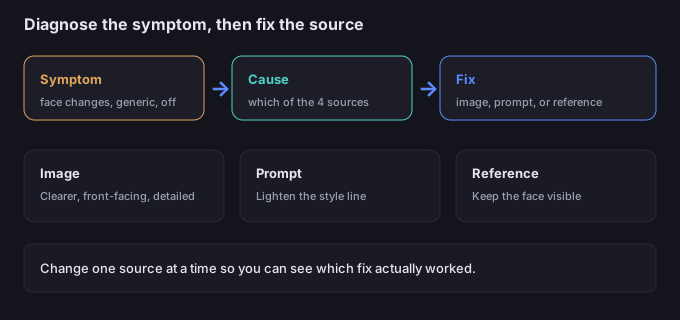
5-step fix workflow
- Identify the symptom. Is the face changing, the look generic, the colors off, or the person wrong? The fix depends on which.
- Check the character image first. Is it clear, front-facing, high-detail, and consistent with how you want the subject to read?
- Review the style line. If it's heavy (anime, vintage, painterly), dial it back to a light grade.
- Review the reference. Does the motion keep the face visible, or turn/cover it for most of the clip?
- Regenerate with one change at a time so you can see which fix worked.
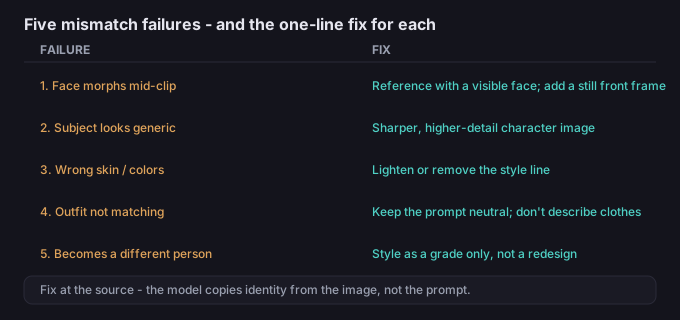
5 failure modes (and the fixes)
| Failure | Why it happens | Fix |
|---|---|---|
| Face morphs mid-clip | Reference hides the face during the move | Reference with visible face; add a still front frame |
| Subject looks generic | Source image lacks detail | Sharper, higher-detail character image |
| Wrong skin / colors | Style prompt shifting the grade | Lighten or remove the style line |
| Outfit not matching | Prompt implies different clothing | Keep prompt neutral; don't describe clothes |
| Becomes a different person | Over-strong stylization | Style as grade only, not a redesign |
What to do when the motion is right but the face isn't
The motion is the hard part and it's working — so don't throw the clip away. If the body and motion read but the face drifts, the cheapest path is to fix the source image and the style line, then regenerate, rather than trying to repair the face in post. And once you have a clip whose motion you like, you can drop or replace the background with the browser tool on this site — it processes the clip in-device, so your media never has to be uploaded to a server.
Common questions
Is the model broken if the character changes?
Usually not. It's identity drift from a weak image, a heavy style, or face-hidden motion — all fixable at the source.
Should I describe the character in the prompt?
No. The character image is the identity source; keep the prompt about the scene and look, not the person.
Why does a strong style change the face?
Heavy stylization can redraw the subject. Use it as a light grade so identity survives.
Is my clip uploaded when I edit it later?
No. The background tools on this site run in your browser, so the media stays on your device.