Motion Control copies the motion from your reference onto your character image. It does not copy a hand shape frame-by-frame like a mask — it re-derives the hand every frame from the pose it estimates plus what it expects hands to look like. That is powerful, but it means hands live or die on whether the inputs give the model something clean to work with. When a hand breaks, that is almost always a message about the reference or the character image, which also means it is something you can fix before spending another generation.
Why hands specifically break
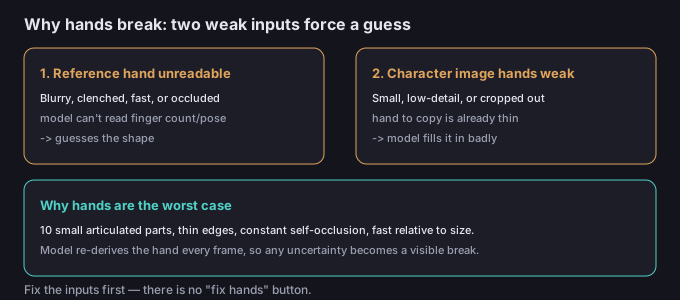
A hand is the worst possible thing for a frame-by-frame video model. It is ten small articulated parts with thin edges, constantly overlapping and self-occluding, moving fast relative to their size. The model re-estimates each frame instead of locking one clean render and sliding it forward (that's what lets it transfer motion onto a new character), so any uncertainty about where a finger is gets amplified into a visible break. If the reference hand is blurry, clenched, moving fast, or partly hidden, and the character image's hands are low-detail, tiny, or cut off, the model fills the gap with a guess — and finger guesses are where AI video earns its reputation.
Symptom → cause → fix
| Symptom | Likely cause | Fix |
|---|---|---|
| Extra or missing fingers | Reference hand blurred/clenched; model guesses count | Open, well-lit, clearly spread hand in the reference |
| Fused / webbed knuckles | Low-detail or small hands in the character image | Use a character image with large, clean, detailed hands |
| Hand melts or swims | Fast hand motion beyond coherence window | Slow the gesture; keep hands larger in frame |
| Floating detached digit | Self-occlusion; model invents a stray finger | Repose so fingers don't cross behind each other |
| Hand vanishes behind body | Reference hand passes behind torso / object | Keep the hand in front and separated from the body |
5-step fix workflow
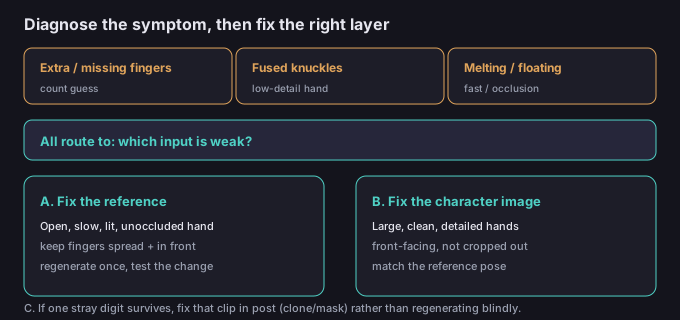
- Name the break. Extra finger, fused knuckles, melting, floating digit, or vanishing hand? The fix is different for each, and most come from a different input.
- Check the reference hand first. Play it back in slow motion. Are the hands open, lit, and unoccluded? Is the motion slow enough to read? A clenched or blurry reference hand is the single most common cause of broken fingers.
- Check the character image hands. Zoom in. Are they large, clean, and detailed — or tiny, low-res, or cropped out of frame? The output hand can only be as good as the hand the model has to copy.
- Re-shoot or re-pick one thing at a time. Open the hand in the reference, or swap to a character image with better hands, regenerate once, and see which change removed the break.
- If one stray digit remains, fix that clip in post (clone/healing brush, or mask it out) instead of burning more generations on a problem you've already isolated.
5 failure modes (and the fixes)
| Failure | Why it happens | Fix |
|---|---|---|
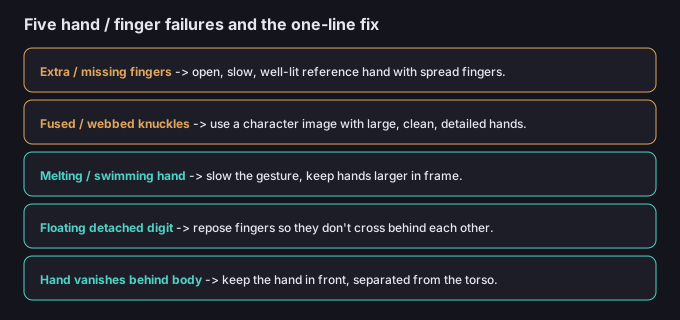
| Extra / missing fingers | Reference hand blurred, clenched, or fast | Open, slow, well-lit hand with spread fingers |
| Fused / webbed knuckles | Low-detail or tiny hands in character image | Character image with large, clean hands |
| Melting / swimming hand | Motion beyond temporal coherence | Slow the gesture; keep hands bigger in frame |
| Floating detached digit | Self-occlusion the model fills in | Repose fingers so they don't cross behind |
| Hand vanishes behind body | Reference hand passes behind torso | Keep hand in front, separated from body |
What to do about the character image
The reference drives the motion of the hand, but the character image supplies the hand itself — its size, detail, and shape. If your character image shows hands that are small, low-resolution, or partly out of frame, every generation will fight to reconstruct them. The cheapest win is often to regenerate or pick a character image where the hands are large, front-facing, and clearly detailed, then feed a reference with a matching, readable hand pose. Match the two and the model has far less to invent.
Common questions
Is there a "fix hands" button?
No. Motion Control has no hand-specific repair. You fix broken hands by improving the reference and the character image — or by touching up the one clip in post.
Does a higher resolution help fingers?
It helps only if the detail is there to begin with. A higher-res render of a blurry, clenched reference hand is still a blurry, clenched hand. Fix the input first.
Does it help to keep hands still?
Often, yes. Slow, deliberate hand motion stays inside the model's coherence window; frantic gestures break. If the pose matters more than the speed, favor a calm hand movement.
Is my clip uploaded when I fix the background later?
No. The background tools on this site run in your browser, so the media stays on your device.