Most of the audio question is settled before you ever hit generate. Kling Motion Control is a one-image, one-video pipeline: the character image supplies identity, the reference video supplies motion — and the reference video also carries whatever sound was recorded with it. The tool passes that sound through or drops it. What it does not do is compose a soundtrack. Once that is clear, the choice stops being mysterious.
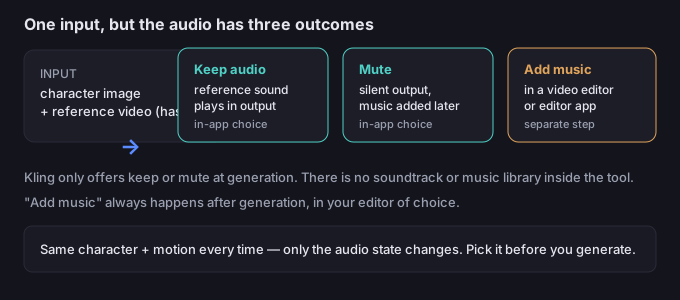
What the tool actually does with audio
Stripped to its mechanics, the audio control is a single flag at generation time:
- Keep — the reference video's original audio track is carried into the output. Whatever was recorded (voice, music, ambient room tone, footsteps) plays under your animated character.
- Mute — the audio track is discarded; the output is silent. The motion is exactly the same, only the sound is gone.
- There is no third in-app state. You cannot pick a song, a genre, or a mood inside Kling. Any soundtrack is added after generation in a separate editor.
This is by design: the feature's job is to transfer motion from a reference to a character image. Audio is either preserved or removed, not generated. So the useful question is not "how do I add music in Kling?" but "should I keep the sound I already have, or start silent and bring my own track later?"
Keep vs mute vs add-music — the decision
Decide by the end use, not by reflex. Here is the mapping most people actually need:
| Your goal | Audio state | Why |
|---|---|---|
| A character lip-syncing dialogue or a voiceover | Keep (or record a clean reference with the right voice) | The spoken sound is the content; muting it removes the point |
| A dance or exercise move meant to land on a beat | Keep if the reference already plays the right track; otherwise Mute + add music | The beat must match the motion; the reference's own music is the simplest fit |
| A product spin, logo reveal, or silent motion graphic | Mute, then add music in the editor | The motion should speak for itself; a chosen track sets the mood |
| Footage that reuses a real location's natural sound | Keep | Ambient sound (wind, street, room) adds realism you'd struggle to fake |
| Anything you'll composite into a larger video | Mute | You'll mix the final audio in your editor once everything is assembled |
If the character will live inside a bigger edit, mute it. You will re-record or re-mix the audio there anyway, and a clean silent clip is far easier to place than one dragging someone else's sound along.
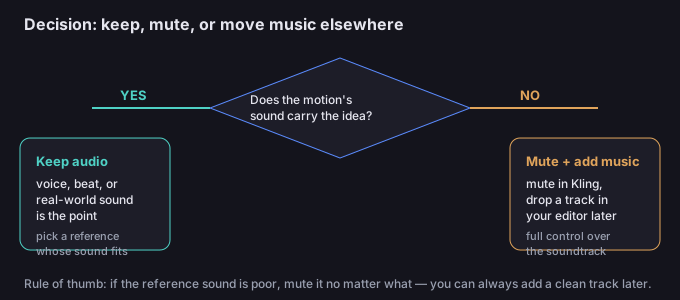
5-step workflow
- Decide the audio before you generate. Open the reference video on its own and listen. Is the sound part of the idea, or just baggage? That single listen saves a regeneration.
- Set the audio flag. Choose "keep" if the sound serves the clip, or "mute" if it doesn't. There is nothing else to toggle.
- Generate and check the sync. Watch the first play-through with sound on. Does the audio line up with the motion? If you kept it, is the reference's sound actually good, or just present?
- If you muted, add the track in your editor. Drop the exported MP4 into any editor, place a music or sound-effects track on a separate layer, and trim to taste. This is where beat-matching and mood actually happen.
- Export the final mix. Render the combined clip once audio and motion are locked. If you also need the subject isolated, do the background removal step first (see below) and keep the audio on the composited result.
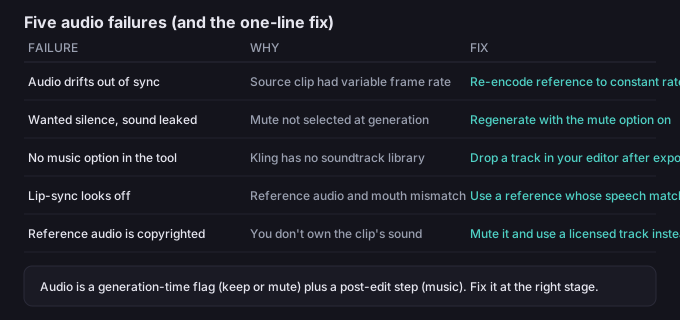
5 failure modes (and the fixes)
| Failure | Why it happens | Fix |
|---|---|---|
| Audio drifts out of sync | The source clip had a variable frame rate | Re-encode the reference to a constant frame rate before generating |
| Wanted silence but sound leaked | The mute option wasn't selected at generation | Regenerate with mute on, or strip the audio in your editor |
| No music option inside the tool | Kling has no soundtrack library | Add the track in a video editor after export — that's the intended path |
| Lip-sync looks off | The reference audio and the face don't match | Use a reference whose speech lines up with the character's mouth |
| Reference audio is copyrighted | You don't own the clip's sound | Mute it and use a licensed track you have rights to |
What to do when the character is right but the sound isn't
Because audio is only "keep" or "mute" at generation, a wrong choice is never fatal — you just fix it at the right stage. Muted and want sound? Add a track in your editor. Kept the wrong sound? Mute it in the editor and bring a clean one. The motion you generated is untouched either way; you are only swapping what plays underneath it.
If you are also isolating the character (for compositing onto a new scene), do the background removal first so the transparent subject carries its audio into the final mix. The tool on this site runs in your browser, so your video never leaves your device while you work — nothing is uploaded to a server.
Common questions
Can Kling add background music for me?
No. There is no music library or soundtrack feature. The only audio states are "keep the reference sound" and "mute." Any music is added in a separate editor after export.
Does muting hurt the motion quality?
No. Mute only removes the audio track; the visual motion is identical. You simply get a silent clip you can score later.
Will the kept audio stay in sync with the motion?
Usually yes, but a reference with a variable frame rate can drift. Re-encode the reference to a constant frame rate first if you see drift.
Can I keep the reference's music and also add my own?
Not at the same time inside Kling. Keep the reference track, then in your editor lower it and layer your own — or mute and start clean.
Are my files uploaded when I edit them?
No. Anything you process with the tools on this page runs in your browser; we never receive your media.