Kling Motion Control is built to take a character image and a reference video and copy the motion from the video onto the character. The character image does not have to be a person or animal. A logo, an icon, or a brand mascot works as that identity input — the system reads it as "this is who moves." What changes is the physics: a person has joints and weight the model can imitate, while a logo is a flat or solid shape with nothing to bend. So the reference video does almost all the work, and your job is to give the model a brand form it can hold onto.
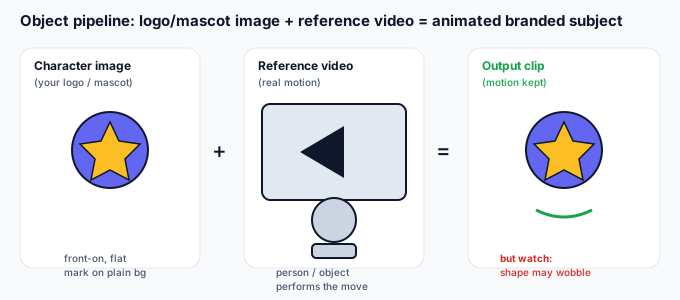
How identity is read from an object
With a person, identity comes from a face and body the model already "knows." With a logo it comes from three things the model can latch onto:
- Silhouette. The outer shape — round badge, square wordmark box, mascot body. This is what the model tracks frame to frame.
- Color and fill. A flat, solid fill gives the model an edge to keep. A gradient or transparent area gives it less to hold.
- Marks and detail. A star, a letter, a stripe. These read as "the brand," but tiny marks are the first thing the model smooths away.
The unique risk with objects: because there is no real anatomy, the model "guesses" how a shape should move and often adds a gentle wobble or breathing motion that a real logo would never have. That is the main thing to plan around.
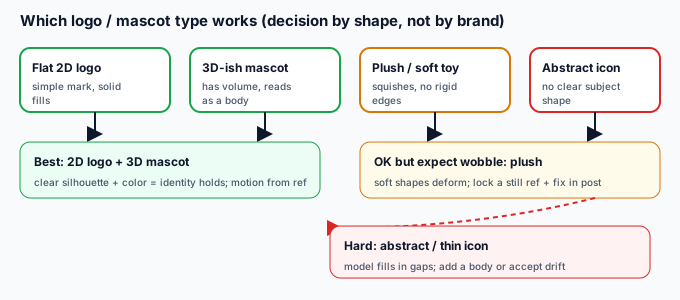
Which logo / mascot type actually works (decision table)
Pick the input by shape, not by how famous the brand is:
| Input type | What you get | Best for |
|---|---|---|
| Flat 2D logo (solid fills, simple mark) | Recognizable, mild wobble | Most reliable brand result |
| 3D-ish mascot (has volume, reads as a body) | Stable, holds shape better | Mascot walk / spin / wave |
| Plush / soft toy mascot | Squishes, edges soften | Cute, loose motion only |
| Product packaging (box / bottle) | Turns okay, label may blur | Spin / turntable shots |
| Abstract icon / thin line mark | Model fills in gaps, drifts | Not recommended as-is |
Why an object breaks differently than a person
A person already has the joints and weight the model expects, so it mostly preserves them. A logo gives the model a shape with no instructions for how it should move, so it invents motion:
- Rigid wobble. A still badge gets a subtle jiggle or "breathing" because the model assumes the subject is alive.
- Color bleed. Brand colors shift or smear as the model "refines" flat areas frame to frame.
- Detail loss. Small text or thin lines get smoothed away — the model treats them as noise to clean up.
- Generic drift. A very abstract mark becomes a vague blob because the model fills the missing anatomy with its own guess.
- Spin distortion. A turntable reference makes a flat logo look like it has depth it doesn't have, then snaps back.
5-step prep guide for a logo or mascot
- Use a front-on, plain-background mark. White or transparent background, the full logo visible, no busy art behind it. The model locks onto the figure, not your backdrop.
- Match the reference to the shape. A slow spin suits a badge; a wave suits a mascot with arms. Don't pick a running reference for a square wordmark — there is nothing to run.
- Keep motion slow and steady. Fast or jerky reference makes a rigid mark wobble more. Smooth, controlled moves hold the brand shape.
- Drop tiny text and fine detail. Render the clean mark without the small print; you can add the text back in post where it stays sharp.
- Stay inside the supported length. Keep the reference clip within the documented duration so the motion transfers cleanly rather than getting cut short.
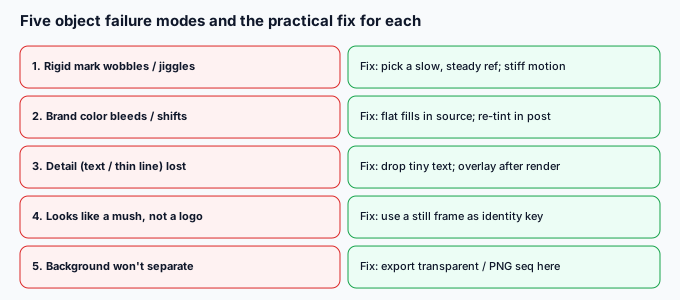
5 failure modes and how to fix them
| Failure | Why | Fix |
|---|---|---|
| Rigid mark wobbles / jiggles | Model adds life to a still shape | Use a slow, steady reference; stiff motion holds the form |
| Brand color bleeds / shifts | Flat fills get "refined" | Use solid fills in the source; re-tint the exact hex in post |
| Detail (text / thin line) lost | Model smooths small marks | Drop tiny text from the source; overlay it after render |
| Looks like a mush, not a logo | Abstract shape drifts | Use a still frame as an identity key, or add a body outline |
| Background won't separate | Reference backdrop stays in | Export as transparent WebM or PNG-seq here, then composite |
What to do when the motion is right but the background isn't
Like any Kling output, the generated clip keeps the reference's backdrop by default. Once the motion looks right, you can drop the animated logo onto a new scene. Open the clip in the tool on this site and export it as a transparent WebM or a PNG-sequence zip — both run on your device, nothing is uploaded. That gives you a clean, animated brand asset you can composite over your own intro, ad, or social post, which is usually the fastest way to recover a crisp mark after the model softens it.
Common questions
Can I animate just my logo with no person at all?
Yes. The character image is the logo; the reference is a separate clip of a real move. The person in the reference never appears — only their motion is copied onto your mark.
Will it keep my exact brand colors?
Mostly, if the source uses solid fills. Flat areas can shift slightly during generation, so keep your exact hex handy and touch it up in post if brand accuracy matters.
Is a 3D mascot better than a flat logo?
Often yes for stability — a mascot with volume already has the "body" the model expects, so it drifts less than a flat badge. Use it when you want the shape to hold through a move.
Are my files uploaded?
No. Anything you process with the background tool on this page runs in your browser; we never receive your media.