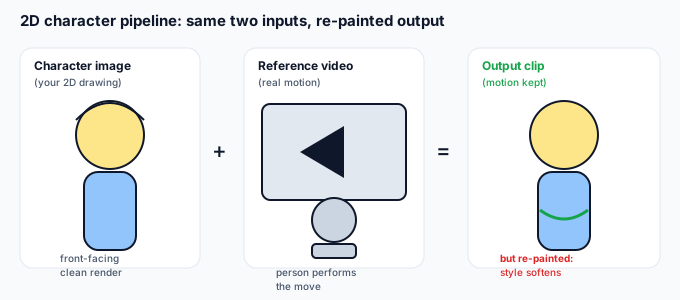
Kling Motion Control is built to take a character image and a reference video and copy the motion from the video onto the character. The character image does not have to be a photograph of a person. A clean 2D anime or hand-drawn character works as that identity input — the system reads it as "this is who moves." What breaks is not the input type; it is the style. The model was trained to render people and objects in a fairly painterly, dimensional way, so a flat, ink-outlined 2D design gets re-interpreted rather than preserved.
How the pipeline treats a 2D character
The split is the same for a photo or a drawing:
- Character image = identity. For a 2D character this is the drawing itself — its silhouette, hair, outfit, and proportions become "who" the result is.
- Reference video = motion. A real clip of a person or actor performing the move. The model extracts the trajectory and applies it to the drawn figure.
- Background and audio follow the usual rules — you can keep or mute the reference's sound, and the original backdrop is its own step after generation.
The unique risk with 2D: because identity is read from a stylized image, the model "fills in" volume, lighting, and texture it thinks a real subject would have. That is where the anime look slips away.
Which 2D input actually works (decision table)
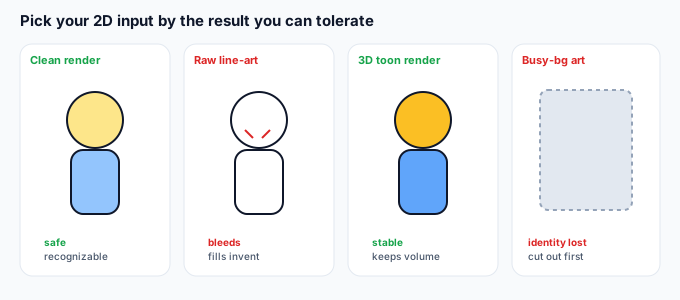
Not all 2D files behave the same. Pick the input that matches the result you want:
| 2D input type | What you get | Best for |
|---|---|---|
| Clean, front-facing cell-shaded render (solid fills, simple shading) | Recognizable character, mild style softening | Most reliable anime result |
| Pure line-art / sketch (no fills) | Outlines bleed and fill in unpredictably | Not recommended as-is |
| 3D-rendered character that "reads" as 2D (toon shader) | Stable, dimensional but still stylized | When you want volume anyway |
| Photo of a printed/drawn character | Re-lit, paper edges and shadows may show | Only if digitized first |
| Fan-art with busy background | Background gets keyed/merged, identity muddied | Cut the subject out first |
Why 2D breaks differently than a photo
A photograph already has volume and lighting, so the model mostly preserves it. A flat drawing gives the model almost nothing to "keep," so it invents the missing depth:
- Style drift. Crisp cel-shading becomes a softer, semi-3D painterly look. Your character is recognizable but not in your art style.
- Outline bleed. Thin ink lines get swallowed or re-drawn wobbly because the model treats them as edges to smooth.
- Flat-color flicker. Large areas of one flat color can shimmer frame to frame as the model "refines" them.
- Proportion guessing. If the drawing's pose differs a lot from the reference actor, the model guesses the in-between volume and the silhouette shifts.
5-step prepare guide for a 2D character
- Use a clear, front-facing frame. A simple standing or half-body pose with the full character visible. Avoid extreme angles that the model must reconstruct in 3D.
- Cut the subject out first. Place the character on a plain background (white or transparent) so the model locks onto the figure, not your art's backdrop.
- Match proportions to the reference actor. If your character is short and round but the reference is tall, the motion will stretch it. Pick a reference whose body shape is close.
- Keep it one character. Group shots or two characters in one image split the identity. One subject per image.
- Stay inside the documented length window. Keep the reference clip within the supported duration so the motion transfers cleanly rather than getting truncated.
5 failure modes and how to fix them
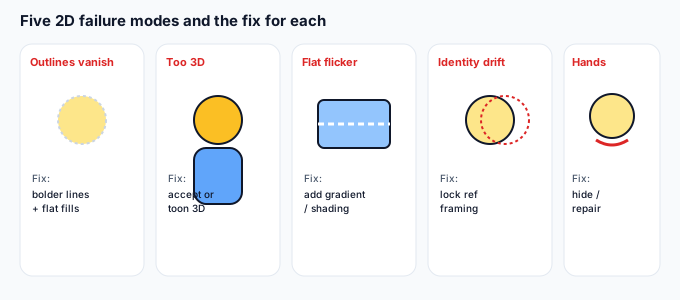
| Failure | Why | Fix |
|---|---|---|
| Outlines vanish | Model smooths thin ink edges | Use bolder line weight in the source, or add subtle fills so edges have contrast to keep |
| Becomes too 3D / loses style | Model invents volume it can't see | Accept the painterly look, or re-style in post; match a toon-shaded 3D render instead of flat art |
| Flat color flickers | Large single fills get "refined" | Add a slight gradient or soft shading in the source so the region has structure |
| Identity drifts mid-clip | Reference framing differs from character | Lock the reference actor's framing close to the character's; re-shoot a tighter match |
| Hands / fingers break | Same hand problem as photos, worse on stylized shapes | Hide hands behind the body or keep them still; repair in post if needed |
What to do when the motion is good but the background isn't
Like any Kling output, the generated clip keeps the reference's backdrop by default. Once the motion looks right, you can drop the character onto a new scene. Open the clip in the tool on this site and export it as a transparent WebM or a PNG-sequence zip — both run on your device, nothing is uploaded. That gives you a clean, animated 2D character you can composite anywhere, which is usually the fastest way to recover the look you actually wanted after the model softens the style.
Common questions
Can I use a hand-drawn sketch that isn't colored?
You can, but expect the model to fill it in on its own. Raw line-art bleeds because the model reads empty areas as "needs detail." Add flat fills first for a more predictable result.
Will it keep my exact art style?
Not reliably. The motion transfers; the style gets re-painted into the model's look. Treat the output as a motion test, then re-style or composite in post if the exact style matters.
Is a 3D character that looks 2D better?
Often yes for stability — a toon-shaded 3D render already has volume the model expects, so it drifts less than a flat drawing. Use it when you want the pose to hold.
Are my files uploaded?
No. Anything you process with the background tool on this page runs in your browser; we never receive your media.