Short answer: there is no single winner. Kling Motion Control is built for one specific job — transfer the motion from a 3–30 second reference video onto a character image you supply. Runway is a broad, subscription-based video studio that also offers a performer-driven motion feature. Wan 2.2 Animate is an open-weight image-animation / face-swap model (the engine behind wan-animate.io / "Animove AI") — it is not a Kling product. Pick by what you already have (a photo? a performance? a stylized image?) and what you want out, not by which is "best."
This is a capability comparison based on how each tool is documented and commonly used in public. It is not a head-to-head benchmark render, and pricing or feature names change — verify on the provider before you commit.
What each tool actually is
Kling Motion Control
Kling Motion Control takes a static character image and a short reference video (about 3–30 seconds), extracts the movement from that clip, and applies it to the character in the image. It offers two orientation modes — match video (good for complex body motion) and match image (good when the camera moves rather than the subject). It can keep the reference clip's original audio or mute it, and it is designed to preserve the identity of the character image you supplied. The output is a video clip. In practice it answers the question: "I have a photo of a person or character and a video of the move I want — make my photo do that move."
Runway
Runway is a general, subscription-based AI video platform. Its core is text-to-video and image-to-video generation. It also ships a performer-driven motion feature (commonly referred to as Act-One) where you record yourself performing and the generated character copies your performance. The difference from Kling is the starting point: Runway leans on a prompt or a generated scene, while Kling leans on a reference clip transferred onto a specific image you own. Runway is a paid product with a limited free allowance, and its motion features sit inside a much larger video toolkit.
Wan 2.2 Animate (and wan-animate.io / "Animove AI")
Wan 2.2 Animate is an open-weight image-animation model — it drives an image (often a face or character) from a source video or image, and it is widely used for character animation and face swap, including stylized and anime looks. Sites such as wan-animate.io present this same engine branded as "Animove AI." Despite ranking for the term "kling motion control," it is a different model family (Wan, not Kling). "Free" here usually means the open-weight model you can run yourself or access through a third-party host — not an official free hosted Kling alternative.
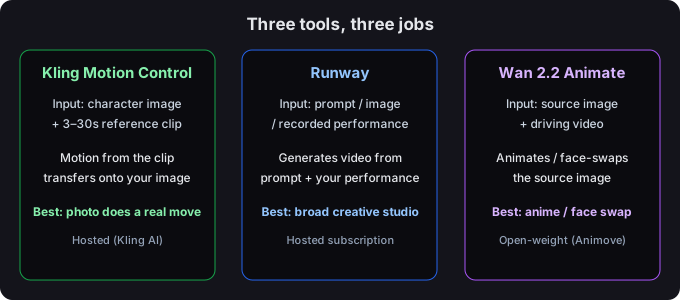
Side-by-side
| Dimension | Kling Motion Control | Runway | Wan 2.2 Animate (Animove) |
|---|---|---|---|
| Core job | Transfer reference-video motion onto a character image | General AI video generation + performer-driven motion | Image animation / face swap from a driving video |
| What you provide | One character image + one 3–30s reference clip | A prompt, an image, or a recorded performance | A source image + a driving video/image |
| Motion comes from | The reference clip's movement | Your prompt and/or your recorded performance | The driving video |
| Keeps a supplied identity | Yes — preserves the character image | Generation-based; identity is emergent | Face-swap oriented |
| Audio | Keep original or mute | Added/generated separately | Not a core focus |
| Free path | Free trial credits (limited) | Limited free plan on a paid platform | Open-weight — free if self-hosted; hosts vary |
| Best for | Making a still character do a real recorded move | Broad creative video, performance capture | Stylized/anime animation, face swap |
| Distribution | Hosted platform (Kling AI) | Hosted subscription SaaS | Open-weight, hosted by third parties |
Which one should you use?
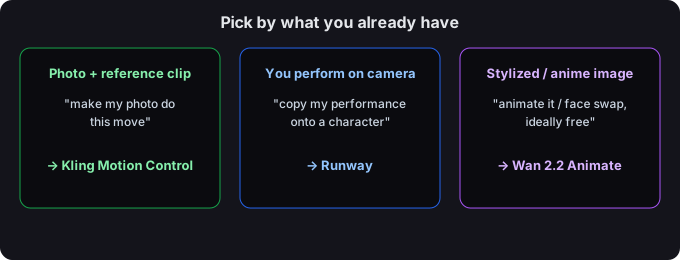
The cleanest way to decide is by your starting material:
- "I have a photo of a person/character and a video of the exact move I want." → Kling Motion Control. This is its exact designed case: your image keeps its identity, the clip supplies the motion.
- "I want to act in front of a camera and have a generated character copy my performance." → Runway's performer feature (Act-One) is the direct fit; Kling can also use a performance clip, but Runway centers the performance workflow.
- "I want to animate a stylized or anime image, or do a face swap, and I'd like it free/self-hosted." → Wan 2.2 Animate, via a host or your own instance.
- "I just want general text-to-video clips, motion transfer is secondary." → Runway (or another general generator).
- "I generated a moving character and now I need it on a new background." → Generate with Kling or Wan, then bring the clip to a background remover (more on that below).
The mix-ups worth clearing up
These three get tangled constantly, so here are the specific points that trip people up:
- wan-animate.io is not Kling. It ranks for "kling motion control" but it runs Wan 2.2 Animate (branded "Animove AI") — a different model. If you land there expecting Kling's image-identity motion transfer, you're in a different tool.
- Runway Act-One vs Kling Motion Control. Both use a reference performance, but Runway starts from a prompt/generated scene and layers your performance on top; Kling starts from your character image and transfers the clip's motion onto it. Same idea, different anchor.
- "Free Wan 2.2" is open-weight, not a free Kling rival. The open model is free to run yourself; hosted versions charge or limit. It is not an official free tier of Kling Motion Control.
After you generate: remove the background
Whichever tool you use, the moving character usually comes out on the reference clip's background. To place it on a new scene, the practical next step is a background remover. Bring the clip to greenscreencut.com and either key out a green/blue backdrop or use the remove-after mode, then export a transparent WebM or a PNG-sequence zip you can composite anywhere. That two-step (generate motion → strip the background) is the workflow the "kling motion control" tutorials rarely show, and it's where a still character becomes usable in a real edit.
Bottom line
Kling Motion Control, Runway, and Wan 2.2 Animate solve different problems. If your asset is a character image plus a reference clip, Kling is the most direct route. If you want a full creative video studio with performance capture, Runway fits. If you want open-weight image animation or face swap, Wan 2.2 Animate is the honest match. Match the tool to your input, and you'll spend far less time fighting the wrong one.