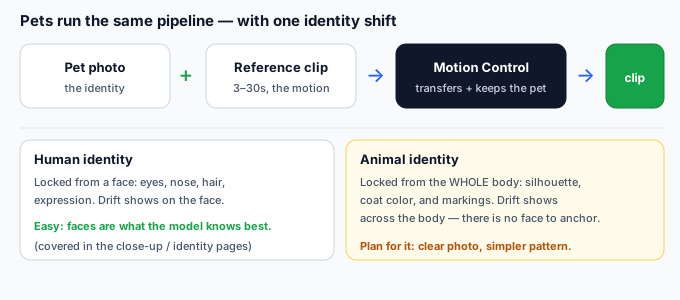
Short answer: Pets and animals are first-class inputs for Kling Motion Control, not a workaround. The feature does not require a human shape — it takes a still character image (who the output looks like) and a 3–30 second reference clip (how it moves), then transfers the motion while preserving the identity from the image. Swap the human photo for a sharp photo of your animal and the pipeline is identical. What changes is the failure profile: animals introduce motion and appearance problems that rarely show up on people, so most "it doesn't work on my dog" complaints are actually fixable reference or photo issues, not a model limitation.
This guide is built from how Kling Motion Control is documented to work — a static character image plus a reference video, with identity preserved from the image and motion read from the clip — and from ordinary animal-video sense about framing and coat. It does not quote any vendor's exact UI labels and does not invent camera specs. Where a fix depends on another tool, that tool is named plainly.
Why pets work at all
The mechanism is the same for any subject. Keep the two inputs separate:
- Your animal photo = the identity. A still. This is who the output looks like. For an animal, identity is the whole body — silhouette, coat color, and markings — not a face. A clear, unobstructed, single-subject photo is what gives the model something stable to preserve.
- The reference video = the motion. A 3–30 second clip showing how the animal moves. The model reads the movement actually visible in the frame and copies it onto your photo's subject.
- The output = your animal, performing the visible motion. It animates the body parts the reference shows moving. The parts the reference never moves, it holds still or invents.
What pets and animals are genuinely good for
Match your intended clip to the table. Most animal clips land in the "great" or "good" rows if the reference actually shows the motion:
| Motion you want in the output | Pet / animal reference? | Why |
|---|---|---|
| Walk, trot, run, gallop (4 legs) | Good — side-on full body. | A clean side view of the exact gait gives the model every leg to copy. This is the strongest animal use case. |
| Sit, lie down, head tilt, look up | Great. | Upper-body and head motion is easy to capture and reads clearly on most animals. |
| Play bow, stretch, shake off | Great. | Whole-body but non-locomotion moves are well contained in a single shot. |
| Carry / fetch / interact with an object | Good — film the interaction. | The reference must show the pet doing the thing; a still photo will not make it "hold" a ball. |
| Fly, swim, or highly unusual motion | Watch the reference. | Birds and fish need a reference that genuinely shows that motion; the model copies what it sees, not instinct. |
| Human-style dancing / standing upright | No — use a suited mascot. | Forcing a quadruped into biped motion invents limbs it does not have. Use a costume/mascot reference instead. |
What breaks with animals — and why
These are the failures specific to non-human subjects. Each is a direct consequence of the input, not a random glitch:
- Four-legged gait distorts. A front-on or cropped reference gives the model no clean leg cycle, so legs cross, slide, or melt. The fix is the reference angle, not a setting.
- Fur and feathers flicker at the edges. Fine hair reads as noise frame to frame, so the outline shimmers. Soft, even light and a touch more smoothing calm it down.
- Markings drift. Spots, patches, and stripes are how the model tells your animal apart. A busy or low-contrast pattern fades or shifts across the clip because there is no face to keep it pinned.
- The animal floats. Pets shot on a bed or grass with no clear ground plane get copied without a sense of contact, so the output hovers. A reference on a visible surface helps.
- Identity softens to "generic animal." A blurry, distant, or group photo leaves the model too little to preserve, so the output becomes a plausible-but-wrong dog or cat. Photo quality matters more than for people.
Which reference to use — a one-line decision
Decide from the output backward, exactly like you would for a person:
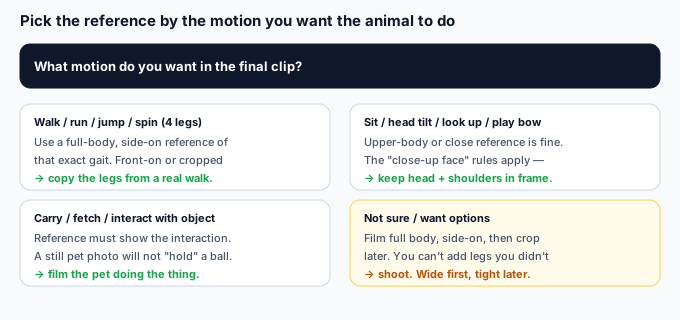
- Final clip is a walk, run, or jump? Film a full-body, side-on reference of that exact gait. Front-on or cropped will not give the model a clean leg cycle.
- Final clip is sit, head tilt, or play bow? An upper-body or close reference is fine — the close-up rules apply, keep head and shoulders in frame.
- Final clip involves an object? The reference must show the pet actually interacting with it; the model cannot invent the grip.
- Not sure / want options? Film full body, side-on, then crop later. You can't add legs you didn't film, but you can always tighten a wide shot.
How to shoot a pet reference that holds up
Animals are less cooperative than a tripod, but a few specifics decide whether the clip reads cleanly:
- Side-on for any locomotion. Film parallel to the animal's line of travel so every leg is visible. This single choice fixes most gait problems.
- Single subject, unobstructed. One animal, no fence bars or hands across the body. The model preserves what it can clearly see; a blocked flank becomes a guessed flank.
- Even, soft, front light. Harsh sun makes fur flicker and throws shadows that read as markings. Overcast or shade gives the cleanest coat.
- Hold the camera steady. A wobbly phone-reference makes the output jitter, same as with people. Brace against something or let a second person hold the animal's attention.
- Keep it in the documented window. Kling's documented reference length runs about 3–30 seconds. A one-second tail-wag is too short to extract a trajectory; a minute-long clip exceeds what the feature reads.
When the pet reference breaks — and the fix
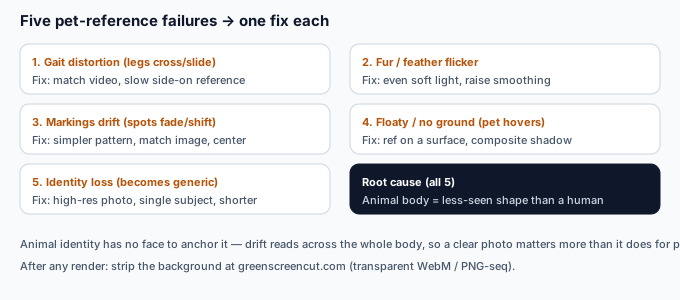
These are the failures specific to using an animal reference. If your clip shows one, the cause is the reference or photo, not the model:
| Symptom in the clip | Caused by (reference / photo) | Fix |
|---|---|---|
| Legs cross, slide, or melt | Front-on or cropped gait reference | Re-shoot a slow, side-on, full-body reference of that exact walk or run. |
| Fur / feather edges shimmer | Harsh light, high-frequency detail | Soften the source light and nudge smoothing up; avoid backlight halos. |
| Spots / stripes fade or shift | Busy pattern, low-contrast photo | Use a simpler, high-contrast coat reference; center the subject; try match image mode. |
| Animal floats, no ground contact | Reference shot with no surface | Film on a visible floor/ground, then composite a soft shadow in post. |
| Becomes a "generic" pet | Blurry, distant, or group photo | Re-shoot a high-res, single-subject, well-lit photo; keep the clip shorter. |
When the pet isn't the problem
If you've used a correct side-on reference and the gait still breaks, the cause has moved to the photo or the generation itself — not the reference framing. Quick triage: keep the same reference, run it against a different animal photo. If gait holds on photo B but not photo A, your reference was fine and the photo was the culprit (blurry, group shot, heavy filter). That is a different fix path, covered in the pieces on character images and on recovering a lost identity — for animals, the photo matters even more because there is no face to fall back on.
After you generate: cut the animal out
Kling returns your animal performing the motion on the reference clip's background — there is no transparent export from Kling itself. If your plan needs the pet on a clean scene (a YouTube thumbnail, a product shot, a client backdrop), bring the downloaded clip to a background remover. One option is greenscreencut.com: open the clip, either key out a green or blue backdrop (if you generated against one) or use the remove-after mode on a normal background, then export a transparent WebM or a PNG-sequence zip. It runs in your browser — the file never leaves your device. A clean, rights-cleared cut-out of your pet or animal clip is the asset you actually ship; the Kling clip was the raw material.
Bottom line
A pet or animal is a first-class character for Kling Motion Control, not a workaround — the pipeline is identical to a person, with your animal's photo as the identity and a reference clip as the motion. The only real catches are animal-specific: a four-legged gait needs a side-on reference to copy cleanly, fur flickers at the edges under harsh light, and markings drift because there is no face to anchor identity. Pick the reference by the motion you want, shoot it side-on and well-lit with a single unobstructed subject, keep the coat pattern simple, and stabilize the camera. When the clip still breaks, the cause is almost always the reference angle or the photo — re-shoot side-on or use a sharper single-subject image — and once the clip is right, lift your subject off the reference background with a background remover to ship it anywhere.