Short answer: A close-up or upper-body reference is not only allowed in Kling Motion Control — for many real use cases it is the better choice. The feature does not need a full-body actor in the reference to animate a face, a head turn, a smile, or an arm gesture. Those motions live in the upper body, and a tightly framed clip captures them more cleanly than a wide shot where your face is tiny. The failure mode people hit is different: they film a talking-head reference, then expect the output to walk across the room, and it doesn't — or it does, badly. The fix is not a setting; it is choosing the right reference for the motion you want. Everything below is about making that choice deliberately.
This guide is built from how Kling Motion Control is documented to work — a static character image plus a 3–30 second reference video, with identity preserved from the image and motion extracted from the video — and from ordinary video-production sense about framing. It does not quote any vendor's exact UI labels and does not invent camera specs. Where a fix depends on another tool, that tool is named plainly.
Why a close-up reference works at all
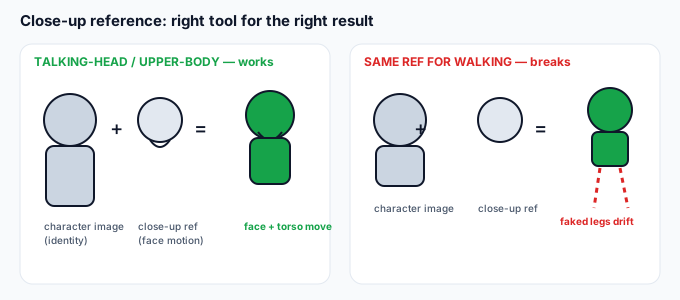
To use the close-up case correctly you only need to keep the two inputs separate in your head:
- Your character image = the identity. A still photo. This is who the output looks like. For a talking-head or upper-body clip, a headshot or head-and-shoulders crop is exactly right — it gives the model maximum face detail.
- The reference video = the motion. A 3–30 second clip showing how something moves. The model reads the movement that is actually visible in the frame.
- The output = your likeness, performing the visible motion. It animates the body parts the reference shows moving. The parts the reference never moves, it holds still or invents.
So a close-up reference is not a "degraded" full-body reference. It is the correct tool for a close-up result. The trap is expecting full-body behavior from it.
What a close-up / upper-body reference is genuinely good for
This is the highest-leverage part of the whole question. Match your intended clip to the table:
| Motion you want in the output | Close-up / upper-body reference? | Why |
|---|---|---|
| Talking to camera, speech, lip-sync feel | Perfect. | Mouth, jaw, and head movement are exactly what a face-framed clip shows. This is the strongest use case. |
| Facial expressions (smile, surprise, squint) | Perfect. | All the signal is in the face. A tight frame gives the model more pixels on the expression. |
| Head turns, nods, looking around | Great. | Head motion is fully captured by an upper-body shot. |
| Arm / hand / shoulder gestures (pointing, waving) | Good — keep arms in frame. | Works as long as the gesture is within the shot. Crop above the elbows and the arms may freeze. |
| Leaning, sitting, upper-body weight shift | Good. | Torso motion is visible in an upper-body frame. |
| Walking, running, dancing, full spin | No — use full body. | The reference shows no legs, so the model invents locomotion. It almost always looks floaty or broken. |
| Full-body pose change (stand → sit far away) | No — use full body. | Any motion that moves the hips and legs needs those limbs in the reference. |
What it cannot do — and why it looks broken
The single most common complaint about "upper-body only" results is a weird, drifting, or melting lower body. It is not a bug; it is a direct consequence of the input:
- The model has no source for the legs. It animates what the reference shows. If the reference ends at the waist, the legs in your output are guessed, not copied.
- Guessed locomotion drifts. A fabricated walk cycle rarely lines up with the upper-body rhythm, so the feet slide, the hips sway wrong, or the whole lower half smears.
- It is most visible on plain or moving backgrounds. A static plain background hides some of it; a busy or scrolling background makes the fake legs obvious.
The practical rule: if the motion you care about touches the hips, legs, or full-body travel, film a full-body reference. Do not try to "fix it later" with a prompt — the prompt controls style and background, not whether legs exist in the source motion.
Which reference to use — a one-line decision
Most confusion disappears if you decide from the output backward:
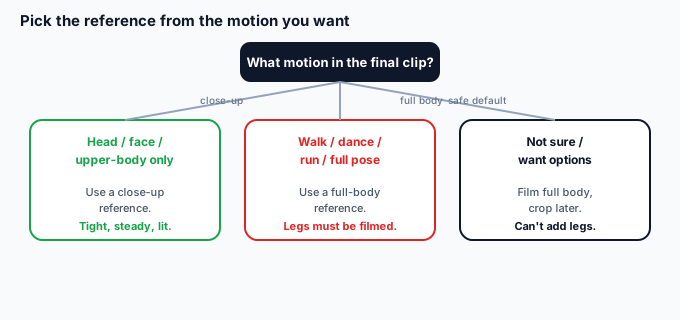
- Final clip is head/face/upper-body only? Film a close-up reference. Tight, stable, well-lit. This is the easy win.
- Final clip includes walking, dancing, running, or a full pose change? Film a full-body reference in the same outfit and lighting as your character image.
- Not sure / want options? Film full body, then crop the reference later for a tighter version. You can't add legs you didn't film, but you can always tighten a wide shot.
How to shoot a close-up reference that actually works
A close-up reference is forgiving, but a few specifics decide whether the face and upper body read cleanly:
- Frame head and shoulders, not just the face. If you crop to the eyebrows, the model has no neck or shoulder motion to work with and the result can look like a floating head. Keep the collarbone in frame.
- Hold the camera steady. A shaky selfie-reference makes the output jitter. Use a tripod, a stack of books, or prop the phone against something. The model reads camera shake as motion it will copy.
- Match the expression you want. The output blends expression from both inputs. A neutral or smiling reference under a "happy" intended clip works; a grim reference under a cheerful one looks off.
- Light the face evenly, front-on. Side light and backlight hide the features the model needs to preserve your likeness. Even front light is what holds identity.
- Keep it in the documented window. Kling's documented reference length runs about 3–30 seconds. A two-second blink is too short to extract a useful trajectory; a minute-long clip exceeds what the feature reads.
When the close-up reference breaks — and the fix
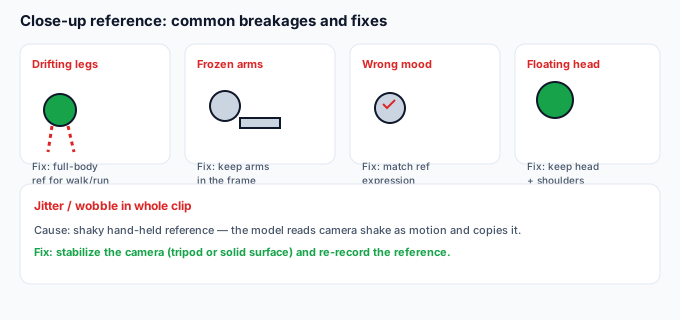
These are the failures specific to using a face/upper-body reference. If your clip shows one of these, the cause is the reference framing, not the model:
| Symptom in the clip | Caused by (reference) | Fix |
|---|---|---|
| Lower body drifts, slides, or melts | You expected locomotion from an upper-body clip | Re-shoot a full-body reference for any walk/dance/run. The close-up simply has no legs to copy. |
| Arms frozen while head moves | Reference cropped above the elbows | Reframe to include shoulders and upper arms; the gesture must be visible in the source. |
| Expression looks wrong for the action | Reference mood clashes with intended clip | Re-shoot the reference with the expression you want in the output. |
| Floating-head look, no neck/shoulders | Cropped too tight on the face | Pull the frame back to head-and-shoulders so there is a body to animate. |
| Whole clip jitters or wobbles | Shaky hand-held reference | Stabilize the camera (tripod/surface) and re-record the reference. |
When the close-up isn't the problem
If you've used a correct close-up reference and the face still drifts or the identity changes, the cause has moved to the character image or the generation itself — not the reference framing. Quick triage: keep the same reference, run it against a different character photo. If the face holds on photo B but not photo A, your reference was fine and the photo was the culprit (low resolution, group shot, heavy filter). That is a different fix path, covered in the pieces on character images and on recovering a lost identity.
After you generate: cut the character out
Kling returns your likeness performing the motion on the reference clip's background — there is no transparent export from Kling itself. If your plan needs you on a clean scene (a YouTube thumbnail, a client backdrop, a product shot), bring the downloaded clip to a background remover. One option is greenscreencut.com: open the clip, either key out a green or blue backdrop (if you generated against one) or use the remove-after mode on a normal background, then export a transparent WebM or a PNG-sequence zip. It runs in your browser — the file never leaves your device. A clean, rights-cleared cut-out of your talking-head or upper-body clip is the asset you actually ship; the Kling clip was the raw material.
Bottom line
A close-up or upper-body reference is a first-class input for Kling Motion Control, not a compromise — it is the correct choice for talking-head, facial-expression, and upper-body-gesture clips, and it gives the model more face detail than a wide shot. The only thing it can't do is produce believable full-body locomotion, because it has no legs to copy; when you need walking, dancing, or a full pose change, film a full-body reference instead. Decide from the motion you want in the final clip, keep head-and-shoulders in frame, hold the camera steady, and stay inside the documented length window. If the lower body still drifts, the fix is the reference, not a setting — and once the clip is right, lift your subject off the reference background with a background remover to ship it anywhere.